Navigating the Platform
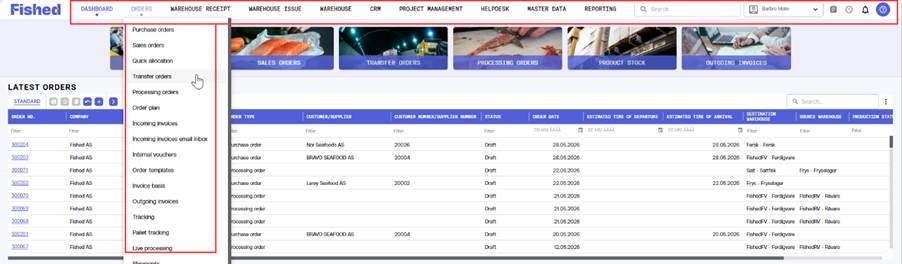
The main menu runs along the top of the screen and is organised into modules that follow the structure of this guide. At the top of every page you will find:
- Global search field — search for any number, customer, product or document from anywhere in the platform.
- Notification bell — receive instant alerts about status changes, approvals and messages.
- User icon — access to profile settings, language selection and signing out.
|
Navigere i plattformen
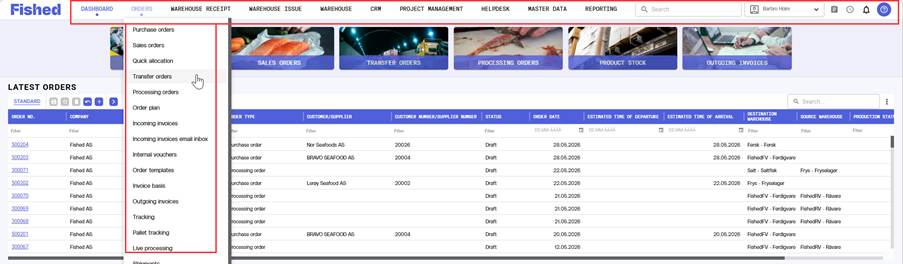
Hovedmenyen ligger langs toppen av skjermen og er organisert i moduler som følger strukturen i denne veiledningen. Øverst på hver side finner du:
- Globalt søkefelt — søk etter et hvilket som helst nummer, en kunde, et produkt eller et dokument fra hvor som helst i plattformen.
- Varselbjelle — få umiddelbare varsler om statusendringer, godkjenninger og meldinger.
- Brukerikon — tilgang til profilinnstillinger, språkvalg og utlogging.
|
Was this article helpful?
That’s Great!
Thank you for your feedback
Sorry! We couldn't be helpful
Thank you for your feedback
Feedback sent
We appreciate your effort and will try to fix the article